Which Parts of an Office Workstation Should Be Adjustable and Which Can Remain Fixed?
An office workstation combines furniture, equipment and accessories that support daily computer and desk-based tasks. Some elements benefit from adjustability because users vary in height, body proportions and working position, while other elements can remain fixed when they are correctly positioned.
That said, when selecting office furniture in Singapore, it is useful to distinguish between components that users need to adjust and those that mainly provide a stable working surface or storage. This approach can help create a workstation that accommodates different tasks without requiring every component to move.
Which Parts of an Office Workstation Should Be Adjustable?
Adjustability is particularly useful for components that directly influence sitting position, viewing height and the placement of the hands and arms. These elements may need to change according to the individual user or task.
Office Chair
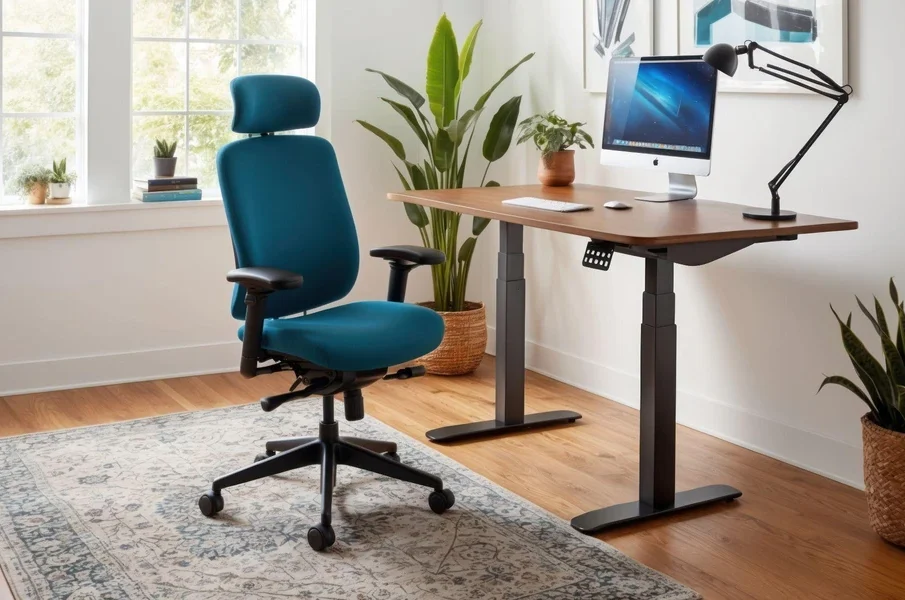
An office chair is one of the main adjustable components of a workstation. Occupational ergonomics guidance generally recommends a seating position that allows the feet to be supported while the thighs remain approximately parallel to the floor.
Useful chair adjustments can include:
- Seat height: Helps users position their feet on the floor or an appropriate footrest.
- Backrest: Supports the back and may allow changes to backrest angle or lumbar support.
- Seat depth: Where adjustable, it can help accommodate different leg lengths.
- Armrests: Adjustable armrests can support the forearms without forcing the shoulders upwards.
These adjustments are especially relevant at shared workstations, where several people may use the same chair.
Monitor Position
Monitor placement should allow the user to view the screen without repeatedly bending or extending the neck. Monitor stands or adjustable arms can provide control over height, distance and, where required, screen orientation.
Adjustment becomes particularly useful when a workstation has multiple monitors or is shared by users of different heights.
Keyboard and Mouse Position
The keyboard and mouse should be positioned so they can be used without excessive reaching. Their placement should also allow the shoulders to remain relaxed and the elbows to stay relatively close to the body.
A movable keyboard or input-device position allows users to adapt the workstation to their sitting position rather than changing their posture to reach the equipment.
Desk Height
A height-adjustable desk is not necessary for every workstation. However, adjustability can help when a desk is shared or when users need to alternate between seated and standing work.
Where the desk is fixed, suitable chair adjustment and, when necessary, a footrest can help accommodate differences between the desk and the user.
Overall, the components closest to the user’s body and line of sight generally benefit most from adjustment.
Which Parts of an Office Workstation Can Remain Fixed?
Not every workstation component needs an adjustment mechanism. Fixed elements can provide stability and may be appropriate when their dimensions and positions do not interfere with comfortable working postures.
Main Desk Surface
A desk surface can remain fixed if its height, depth and available legroom are suitable for the intended users and equipment. Fixed-height desks are commonly combined with adjustable seating and monitor equipment.
The surface should provide enough room for the equipment required for the task without forcing frequently used items beyond a practical reach.
Storage Units
Pedestals, cabinets and shelving can generally remain fixed once they are positioned appropriately. The main consideration is whether their location affects legroom, circulation or access to frequently used materials.
Items used regularly should be easier to reach than materials accessed only occasionally.
Office Partitions
Partitions and workstation screens usually do not require frequent adjustment. They can remain fixed where they provide the intended separation without obstructing movement, visibility requirements or access to equipment.
Cable Management and Equipment Supports
Cable trays, power access points and some equipment supports can also remain fixed after the workstation has been configured. Their position should avoid restricting adjustable components such as monitor arms or sit-stand desk mechanisms.
That said, for businesses choosing office furniture, separating fixed structural elements from user-adjustable components can simplify workstation planning. Fixed parts provide the basic layout, while adjustable elements accommodate individual users.
How Do Adjustable and Fixed Workstation Elements Work Together?
An effective workstation does not depend on making every component adjustable. Instead, fixed and movable elements should work together so that users can position themselves and essential equipment appropriately.
For example, a fixed desk can be combined with an adjustable office chair, monitor arm and suitable input-device placement. This allows several important dimensions of the workstation to be changed without replacing the desk itself.
A practical setup should consider:
- whether the user’s feet are properly supported;
- whether the desk allows adequate legroom;
- whether the screen can be viewed without sustained awkward neck positioning;
- whether the keyboard and mouse can be reached comfortably;
- whether frequently used objects are within convenient reach; and
- whether adjustments can be made without obstruction from storage or cables.
Shared workstations may require greater adjustability because the same setup needs to accommodate multiple users. A workstation assigned to one person may require fewer movable components once it has been correctly configured.
The key distinction is functional: elements that affect posture, reach and viewing position often benefit from adjustment, while structural components can usually remain fixed when their dimensions and placement are suitable.
Connect with Ergoworks to create a functional workstation today.